This article will guide you through the testing process to build personalized corrective exercise blocks that address each client's specific needs and lay the foundation for long-term success.
If you prefer to watch a video instead, please scroll to the bottom of the page for our video section.
A few things to note, before we get started.
Where do I find the Senior Fitness Test
There are two simple ways to start the test at your client's next session.
Client Route:
- Go to the "Your Clients" section on the right-hand side of the activity dashboard and click the "View Profile" button underneath one of your clients.
- You now see your attendee details and you can click the "Start a new test" button on the bottom right of your screen to start the test.
Bookings Route:
- In your activity Feed, click the "View Details" button on one of your bookings.
- Scroll down to the attendee and click the "more" button on the bottom right.
- Now you will see your attendees' details and you can click the "Start a new test" button on the bottom right of your screen to start the test.
How often should a senior take the test
- To see best performance improvements, it is recommended to redo the test every 3-6 months.
Pre-Test Checklist for Trainers
- A sturdy, armless chair (approx. 17" high) placed flat against a wall for safety.
- Hand weights: 5 lbs for women or 8 lbs for men.
- An 18-inch ruler or measuring tape.
- A stopwatch.
- A floor cone or piece of tape.
Step-by-Step Test Administration
Want to try the test yourself?
Take the Senior Fitness Test to experience it first-hand before trying it out on an ElderFIT customer.
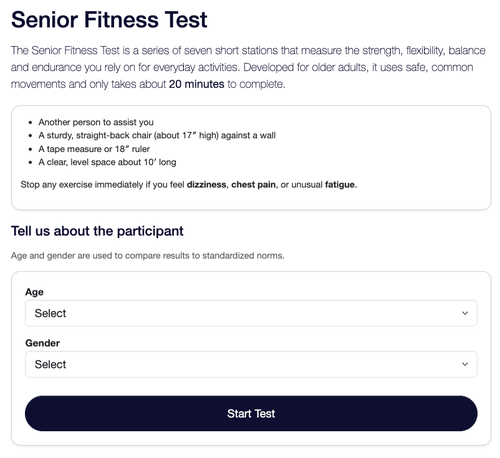
Step 1: Your Client's Demographic Data (age and gender)
- Start by navigating to the Senior Fitness Test page, as described in the steps above
- Input Demographic Data: Select your senior customer's Age and Gender from the dropdown menus.
Note: This step is crucial because the system uses this data to pull the exact peer-reviewed reference ranges for their specific demographic. - Begin: Click the 'Start Test' button to launch the assessment sequence.
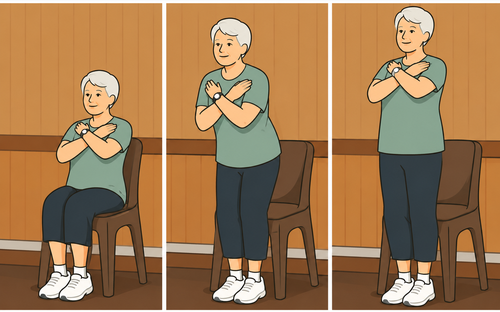
Step 2: Lower-Body Strength (Chair Stand Test)
- Position the Client: Have them sit in the center of the chair with feet flat on the floor, shoulder-width apart.
- Setup: Instruct them to cross their arms at the wrists and hold them flat against their chest.
- Execute: Start the timer. On "Go," the client stands up completely and sits back down repeatedly.
- Log Results: Count only full, completed stands. Type the number into the Chair Stand Test field on the portal.
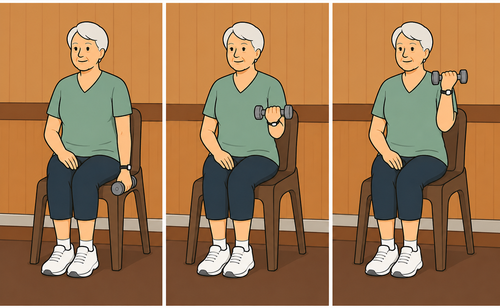
Step 3: Upper-Body Strength (Arm Curl Test)
- Position the Client: Have them sit upright on the edge of the chair.
- Setup: Place the appropriate weight (5 lbs for women / 8 lbs for men) in their dominant hand. The arm starts extended downward, palm facing the body.
- Execute: Start the timer. Instruct the client to curl the weight up through a full range of motion, rotating the palm upward (supination) on the way up, and returning fully to the bottom.
- Log Results: Count total completed reps and type the number into the Arm Curl Test field.
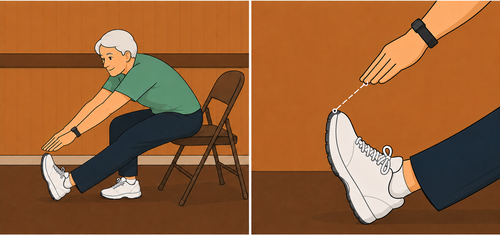
Step 4: Lower-Body Flexibility (Chair Sit-and-Reach Test)
- Position the Client: Have them move to the very front edge of the chair.
- Setup: Keep one foot flat. Extend the target testing leg straight out in front with the heel on the floor and ankle flexed at 90°.
- Execute: Have the client place one hand on top of the other (middle fingers aligned) and slowly reach forward toward their toes. They must hold the stretch for 2 seconds.
- Log Results: Measure the space between their fingertips and toes using your ruler.
- Short of toes: Enter a negative number (e.g., -2 inches).
- Touching toes: Enter 0.
- Overlapping toes: Enter a positive number (e.g., +1 inch).
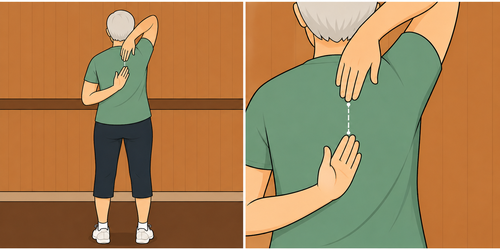
Step 5: Upper-Body Flexibility (Back Scratch Test)
- Position the Client: Have the client stand up straight.
- Setup: Instruct them to bring their preferred hand over their shoulder and reach down their back (palm facing in). At the same time, reach the other hand up from the lower back (palm facing out).
- Execute: Have them try to touch or overlap the middle fingers of both hands.
- Log Results: Use your ruler to measure the distance between the tips of the middle fingers.
- Fingers do not meet: Enter a negative score.
- Fingers overlap: Enter a positive score.
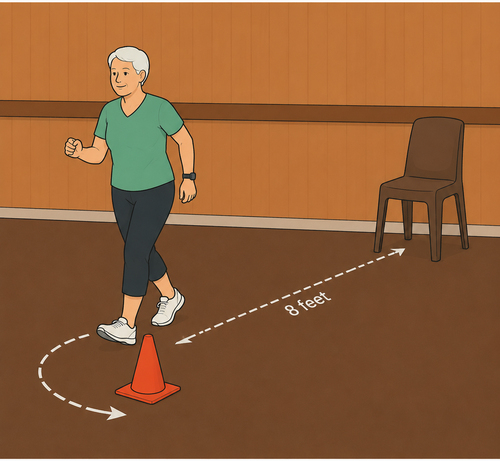
Step 6: Agility & Dynamic Balance (8-Foot Up-and-Go Test)
- Position the Client: Place a cone marker on the floor exactly 8 feet in front of the chair. The client starts fully seated with hands on their knees.
- Execute: On "Go," start the timer. The client stands, walks as quickly and safely as possible around the cone, and returns to a full seated position. Perform 2 separate trials.
- Log Results: Note the time for both attempts. Record their fastest time to the nearest tenth of a second in the portal.
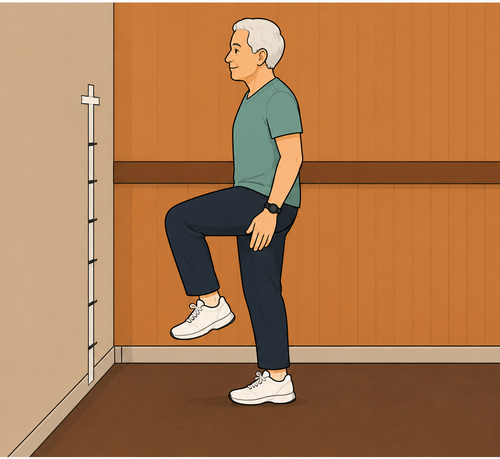
Step 7: Aerobic Endurance (2-Minute Step in Place)
- Position the Client: Stand the client next to a wall.
- Setup: Measure the midpoint between the client's kneecap and their hip bone. Mark this exact height on the wall with a piece of tape.
- Execute: Start the timer. On "Go," the client begins marching in place. They may slow down or hold the wall for balance if needed, but the clock does not stop.
- Log Results: Count every time the right knee successfully reaches the tape line. Enter the total count into the final field.
Step 8: View the Evaluation Baseline
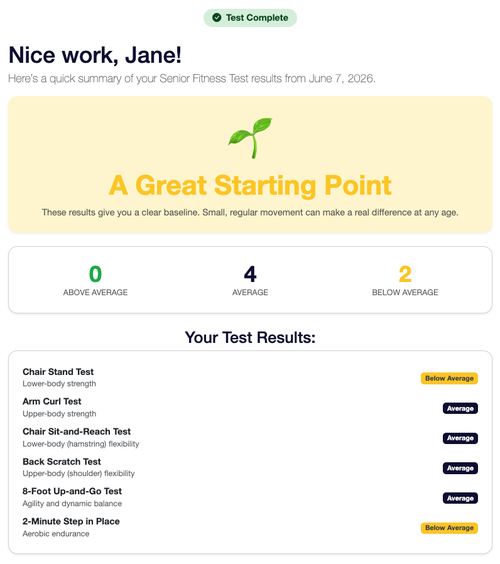
Once you click submit, you will land on the Your Results Dashboard. The portal instantly compares your client's raw numbers against age and gender norms to categorize their fitness metrics:
- Above Average: Performance exceeds the baseline reference range. Excellent foundation; ready for progression.
- Average: Performance lands comfortably within the baseline reference range. Focus on maintaining functional capacity.
- Below Average: Performance falls below the demographic standard. Prioritize these areas in their upcoming introductory ElderFIT training blocks to safely restore functional mobility.
Next Steps & Reassessment Protocol
Use these markers to customize their introductory Corrective Exercise plans.
The Senior Fitness Test is not a one-time event; it is an ongoing roadmap for your client's longevity. This test must be repeated every 3 to 6 months. Regular reassessment allows you to objectively measure tangible functional improvements, validate the effectiveness of your corrective exercise blocks, and keep your senior customers deeply motivated by showing them hard proof of their progress.